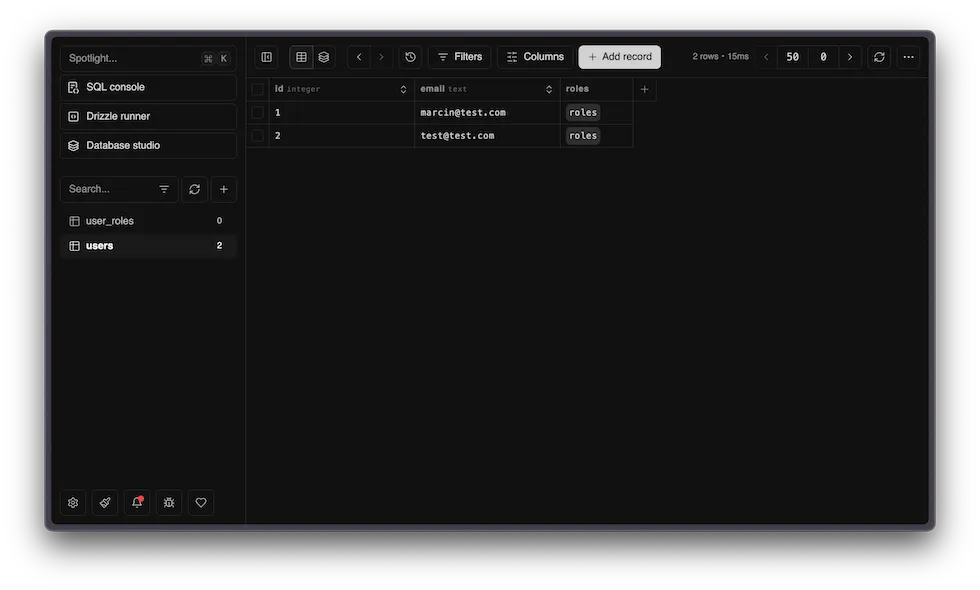
Database
Database integration with Cloudflare D1 (SQLite) and Drizzle ORM. Pre-configured for local development, migrations, and production deployment.
Key features
- SQLite database running on Cloudflare’s edge
- Type-safe queries with Drizzle ORM
- Automatic migration generation
- Visual database browser with Drizzle Studio
- Separate databases for production and preview
Database Commands
Section titled “Database Commands”bun run db:studio # Open visual database browserbun run db:generate # Generate migrations from schema changesbun run db:migrate # Apply migrations locallybun run db:reset # Delete all migrations and regenerate from scratchAccessing the Database
Section titled “Accessing the Database”Use getMainDb() from @/db/main to access the Drizzle ORM instance. Call it inside server functions:
import { createServerFn } from "@tanstack/react-start"import { getMainDb } from "@/db/main"import { user } from "@/db/main/schema"
const listUsers = createServerFn({ method: "GET" }).handler(async () => {  const db = getMainDb()  return db.select().from(user).all()})
The db object is a Drizzle ORM instance with full TypeScript support.
Schema Definition
Section titled “Schema Definition”Database schemas are defined in feature modules and then aggregated at packages/db/main/:
Directoryapps/
- auth/db/schema.ts Better Auth tables (user, session, account, verification)
- newsletter/db/schema.ts Newsletter tables
Directorypackages/db/
Directorymain/
- schema.ts Main database schema
Directorymigrations/ Generated SQL migrations
- …
Example schema:
import { sqliteTable, text, integer } from "drizzle-orm/sqlite-core"
export const user = sqliteTable("user", {  id: text("id").primaryKey(),  name: text("name").notNull(),  email: text("email").notNull().unique(),  emailVerified: integer("email_verified", { mode: "boolean" }).default(false).notNull(),  role: text("role").default("user"),})
Adding a New Table
Section titled “Adding a New Table”-
Create or update a schema file in your feature’s
db/folder:apps/blog/db/schema.ts import { integer, sqliteTable, text } from "drizzle-orm/sqlite-core"export const posts = sqliteTable("posts", {id: integer("id").primaryKey(),title: text("title").notNull(),content: text("content"),}) -
Export it from
packages/db/main/schema.ts:export * from "@/blog/db/schema" -
Generate a migration:
Terminal window bun run db:generate -
Apply the migration locally:
Terminal window bun run db:migrate
The migration is automatically applied in CI/CD via Wrangler when you push your changes.
Multiple Databases
Section titled “Multiple Databases”The database package is structured to support multiple D1 databases. Each database configuration entry point lives under its own subdirectory in packages/db/, named after the binding (minus the DB_ prefix and lowercased). The main database is at packages/db/main/ - corresponding to the DB_MAIN binding - but additional databases can be added following the same pattern, e.g. packages/db/secondary/ for a DB_SECONDARY binding.
-
Create the new database in Cloudflare:
Terminal window bunx wrangler d1 create <project-name>-secondary-development -
Register the new binding in
wrangler.jsonfor every environment:"d1_databases": [{ "binding": "DB_MAIN", ... },{"binding": "DB_SECONDARY","database_name": "<project-name>-secondary-development","database_id": "<DATABASE_ID>","migrations_dir": "./packages/db/secondary/migrations"}] -
Create the schema and db server files:
packages/db/secondary/schema.ts import { integer, sqliteTable, text } from "drizzle-orm/sqlite-core"export const posts = sqliteTable("posts", {id: integer("id").primaryKey(),title: text("title").notNull(),})packages/db/secondary/db.server.ts import { env } from "cloudflare:workers"import { drizzle } from "drizzle-orm/d1"import * as schema from "./schema"export function getSecondaryDb() {return drizzle(env.DB_SECONDARY, { schema })} -
Generate and apply migrations for the new database:
Terminal window DB_BINDING=DB_SECONDARY bun run db:generateDB_BINDING=DB_SECONDARY bun run db:migrate
Drizzle Studio
Section titled “Drizzle Studio”Browse and edit your database visually:
bun run db:studioOpens at local.drizzle.studio where you can:
- View all tables and their data
- Run queries
- Edit records directly
- Explore relationships